The Case for Agent Sandboxes
This note covers Adam Azzam’s session in the AI Product Engineering series.
If you run coding agents locally, the need for a sandbox may not be obvious yet. It starts to matter once your coding velocity picks up, you run many agents in parallel, or you start collaborating with others. A sandbox isolates the code each agent runs and keeps the blast radius small when something breaks.
CI/CD (the tool many people try first) is a poor fit. It’s slow to start and short-lived, while an agent may work on a task for hours or days and edit the dependencies of its own environment. The agent’s code is also unreviewed, so a bad change can crash the machine or expose the credentials in the environment.
Slow startup becomes a bottleneck once you run agents at volume. Ramp solves this by baking its machine image on a 30-minute schedule with everything installed. When an agent starts, it grabs a ready machine, runs git pull, and is working in under a second.
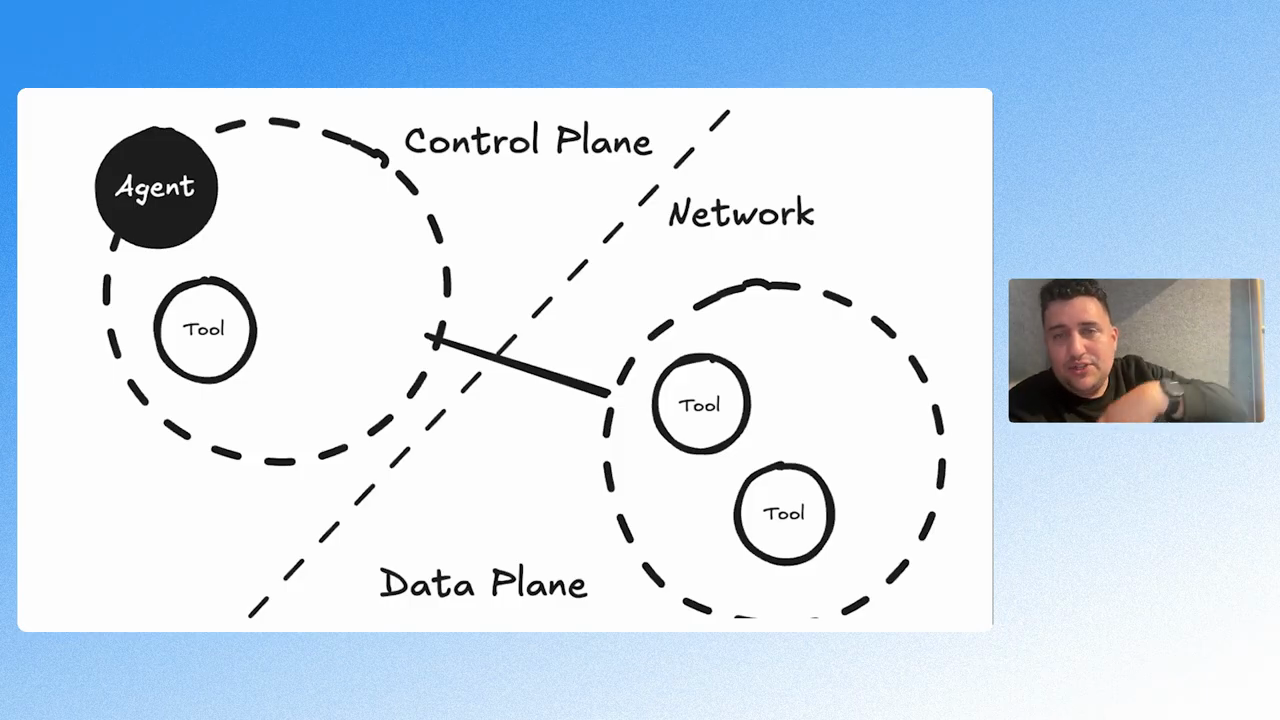
Another design principle is to separate the agent from the tools it calls. If a tool crashes, you don’t want it to take down the agent. For example, a tool that loads a large CSV and runs out of memory shouldn’t kill a long-running agent trajectory.
Adam currently works at Modal, which is my favorite cloud infrastructure. It’s unique in that it’s so fast that it feels local, even though code is running remotely. The hello world example for creating a sandbox in Modal is:
import modal

app = modal.App.lookup("sandbox-hello-world", create_if_missing=True)
sb = modal.Sandbox.create(app=app)
process = sb.exec("echo", "hello")
print(process.stdout.read())
sb.terminate()
Watch Adam’s full session on agent sandboxes. Also, read the Modal sandbox guide.
To learn how to evaluate the agents you run in these environments, see the AI Evals course, a live cohort with hands-on exercises and office hours.